My personal infra (2025 edition)
⚠️ This article is an automated translation. While I personally reviewed the content before publication, some inaccuracies may remain. Read the original French version.
At the beginning of the year, I decided to clean up my home infra (which I use to store/share documents, manage my passwords, host this blog, etc.). Over the years, this infra had become increasingly complex (due to more and more services), and above all, I basically never had time to make my changes properly: I was in a total YOLO approach, with a GitLab 15 exposed to the four winds, abysmal performance on half of my infra (👋 my Nextcloud which survived for a year with 500MB of RAM and half a CPU), a frightening proliferation of servers, a questionable backup strategy… In short, it was a mess.

Even Hubert says so…
Just for fun, and to give you the level of perdition of the ship: I was using 3 dedicated servers (Scaleway Dedibox Start-2-L), 2 VPS at BeYs, and all this mess happily connected by a VPN to pass data through it. I had bits on the left, others on the right, cross-backups on these two infrastructures, GlusterFS mounts… for an almost non-existent utility in the end! As a reminder, I only host my personal services on it: Nextcloud, VaultWarden; in short, nothing that justifies such a gas factory.
My services were (90%) deployed with Ansible and Docker containers. I had everything in a good old 1800-line playbook.yml; and of course no tags. In other words, when I wanted to update Traefik, I updated… the whole infra. And generally, it broke everywhere. 😎
But fortunately for my infra (and my mental health), the beginning of the year allowed me to stick my nose back into all that, and the decision was radical: “Sir, we have to cut everything”. Not only because it was a monumental mess that would have taken me hours to untangle, but also because the performance of my machines was too poor. I therefore went in search of a new “good big dedicated server” that could host my entire infra without flinching. Yes, it’s a SPOF, but I don’t have 100 bucks a month to put into this kind of thing either; so we’ll make do.
And, by chance, OVHCloud was offering promos on their “So You Start” range (these are OVH’s refurbished servers but they are still better off than the Kimsufis). The technical sheet is really nice for a very reasonable price (€40 per month), so I took the plunge. (Originally, I wanted to take 3 KS-A at €5 per month and set up a Kubernetes cluster on it, but legend has it that the last person to succeed in ordering one did so before OVH’s IPO, around 2022).
I therefore set my sights on a SYS-1 in SATA disk version to have a nice capacity (did you know that .RAW files from a Canon EOS 90D eat 50MB per image?). In detail, here are the perfs:
- A Xeon-E 2136 (6 cores, 12 threads) - 3.3GHz/4.5GHz
- 32GB of RAM at 2666MHz
- 8TB of disk, in 2*4TB Soft RAID
- 500Mbps unlimited incoming/outgoing
- One IPv4 + One /64 in IPv6 (so that the day I get around to it, I’ll be dual-stack)
Why not set all this up locally?
For several reasons:
- I live in an apartment, and setting up a server-room is a bit complicated in the current state of things;
- I consider that a provider will always be more reliable than me, having no air conditioning, no redundancy, no BCP, no 24/7 surveillance, anyway, you get the point;
- I don’t want to bother with Orange and their wonderful livebox and find myself spending my weekends doing networking to try to make things work. We won’t even talk about DynDNS and company.
- In short: it’s great if you have the time and means to do it, but in my case, it’s no!
What does my infra do?
My infra serves me for many things daily! It hosts:
- My files, my calendars and my contacts (with a Nextcloud & Collabora server);
- My source code (with a GitLab and its little runner);
- Static websites (my presentations, this blog, the course site for my students, etc.);
- My passwords (VaultWarden);
- My mail server (maybe wasn’t the best idea but that’s not the subject);
- A VPN to secure my connection when I’m traveling / on public WiFi;
- An n8n to perform my tech watch and some similar tasks;
- Various small “tinkering” projects;
- And a small Minecraft server from time to time.
Many things, granted, but in the end nothing extremely resource-hungry. My new dedicated server at OVH should therefore more than do the job!
Are we off? We’re off!
Once I received my OVH server, I started by installing Alpine Linux. This is a huge advantage of OVH: on the dedicated range, you have a “Bring Your Own Image” mode, which allows you to manage on your own: you connect to the IPMI, start the virtual disk containing our ISO, and off we go. A few tens of minutes later, here I am with a fresh Alpine and an entire server to configure.
Given the number of services to run, Docker sounds like an obvious choice. However, I would like to have a bit more functionality than what Docker natively allows me; notably by being able to update my services without having to shut them down during the update; and above all have an automatic rollback if something fails - I’ve had enough of spending 4h on a problem that should have taken me 2 minutes. For comfort and spirit of simplicity, I’m going with a single-node Docker Swarm. The choice is purely pragmatic: I master this tech very well, it matches my need, while keeping an ultra-simple Docker installation (because Docker is available directly in the apk packages on Alpine, so apk install docker and bang, off we go). Anyway, I won’t bore you with Swarm again, since I already wrote an article about it.
Well, now that I have a Swarm single-node ready to accept traffic, I start deploying the essential services for everything else: Traefik, swarm-cronjob, and rclone.
- Traefik will handle relaying my requests to the right containers according to the requested host;
- swarm-cronjob allows executing cron tasks in Swarm services, which makes my life easier;
- rclone allows me to do my backups.
And, to make my life even easier, I set all this up through a good old Ansible playbook. I take the opportunity to automate some important configurations: user accounts (because alpine as a user is evil!), Docker installation, network openings & the firewall, as well as authentication to my private Docker registry (to be able to pull images). As I don’t have my VaultWarden deployed yet, I use ansible-vault as a secret manager. It’s not ideal, but we’ve seen worse. The playbook is available in the Bootstrap/ folder of the GitHub repository.
Now, all that’s left is to deploy my services. To do this, I create a project on my GitLab for each tool to deploy, and I put the same structure inside: an Ansible playbook that allows me to start a Swarm service.
|- Mailserver/
   |- playbook.yml
   |- README.md
   |- requirements.yml
   |- files/
      |- [...]
   |- inventories/
      |- servers
   |- tasks/
      |- backup.yml
      |- install.yml
      |- prepare.yml
   |- vars/
      |- vars.yml
|- Gitlab/
   |- [...]
To retrieve secrets, I use a bit of code that allows me to bridge my VaultWarden and GitLab CI, thanks to the CI_JOB_TOKEN. I’m not publishing (for now) this code because it’s really horrible and it’s a very bad idea to use it (personally, I use it only locally on the server, it’s not exposed).
I manage my versions with tags on GitLab. Thus, an “18.0.1” tag on the GitLab project will automatically launch the CI allowing my server to be updated without manual manipulation.
These playbooks are available in their respective folders on the GitHub repository.
Now that I have my infra and all my services deployed “as-code”, I add backups. Once again, as you’ve understood, backups will run in Docker Swarm “job” services. I’ve already written a blog post on backups, so I’ll let you check the article on the subject if you want the details! Of course, my dedicated server being at OVH, I took the precaution of performing my backups at another provider. You can never be too careful!
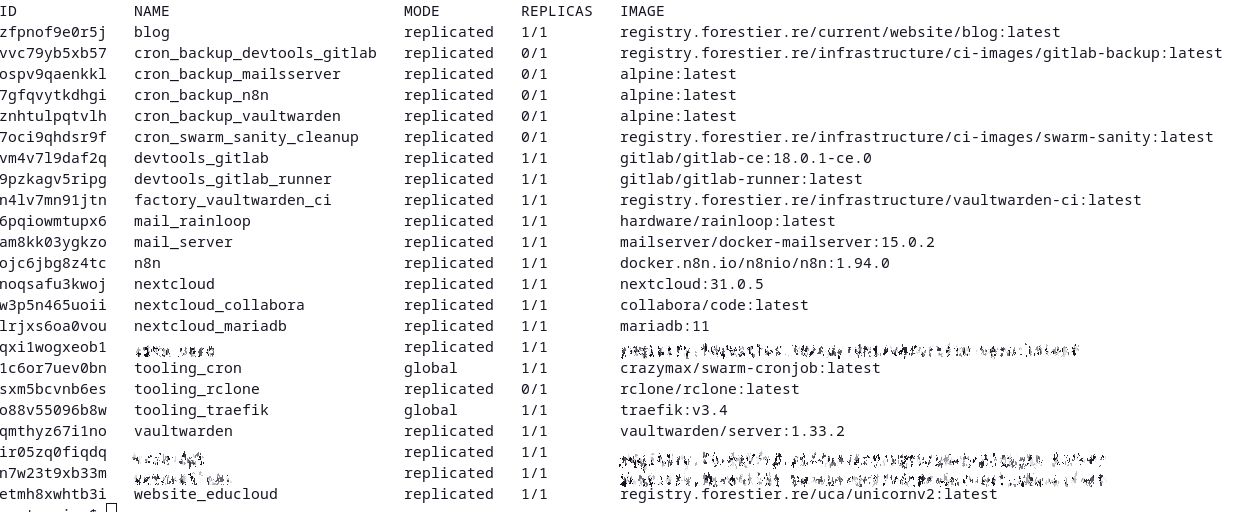
The list of my deployed services
And now?
Now, my infra is finally running on something viable, maintainable and above all simple. I’ve freed up quite a big load by re-automating all my infrastructure, and my approach allows me to keep an easy daily management. I still have to put monitoring back in place, however: I didn’t have the courage to do that at the start; and I think I’ll re-use one of my VPS to do it (because self-monitoring is not the most reliable).
Now, one question remains: How to automate my infra updates, and thus no longer even have to create tags manually in GitLab? Well, that will be for next time… 😉