Updating a Swarm cluster without interruption
⚠️ This article is an automated translation. While I personally reviewed the content before publication, some inaccuracies may remain. Read the original French version.
When hosting potentially critical services, we like to think that the infrastructure is totally resilient, and above all, that we can modify it without impact for our customers. The goals are multiple, but today, we are going to focus on the (often forgotten) sinews of war: updates. And when I talk about updates, I’m not talking about updating your services, no way: I’m talking about the updates that no one wants to do, namely those of the operating systems and the software underlying your infrastructure.
So today, a feedback on upgrading a Docker Swarm cluster without service interruption.
Existing & Target Environment
Our existing environment is as follows: we have three virtual machines deployed on an OpenStack, booting Alpine Linux 3.14. These three virtual machines form a Docker Swarm cluster, version 21. These three machines are accessible from the Internet on port 443. For this, a Traefik is deployed in global replication (one per node), and exposes its port to the outside.
The three instances communicate with each other via a Neutron virtual network. As a security measure, Docker virtual networks are also encrypted via the native IPSec encryption in Docker Swarm.
On the outside, the machines are exposed using a common DNS: the three instances each have an IPv4, and *.cluster.my-example.com contains the three IP addresses: so we have a round-robin DNS. In practice, we also have a load-balancer above that handles failover if necessary, but this load-balancer is not under our control, so we will consider it absent and acting like a normal client here.
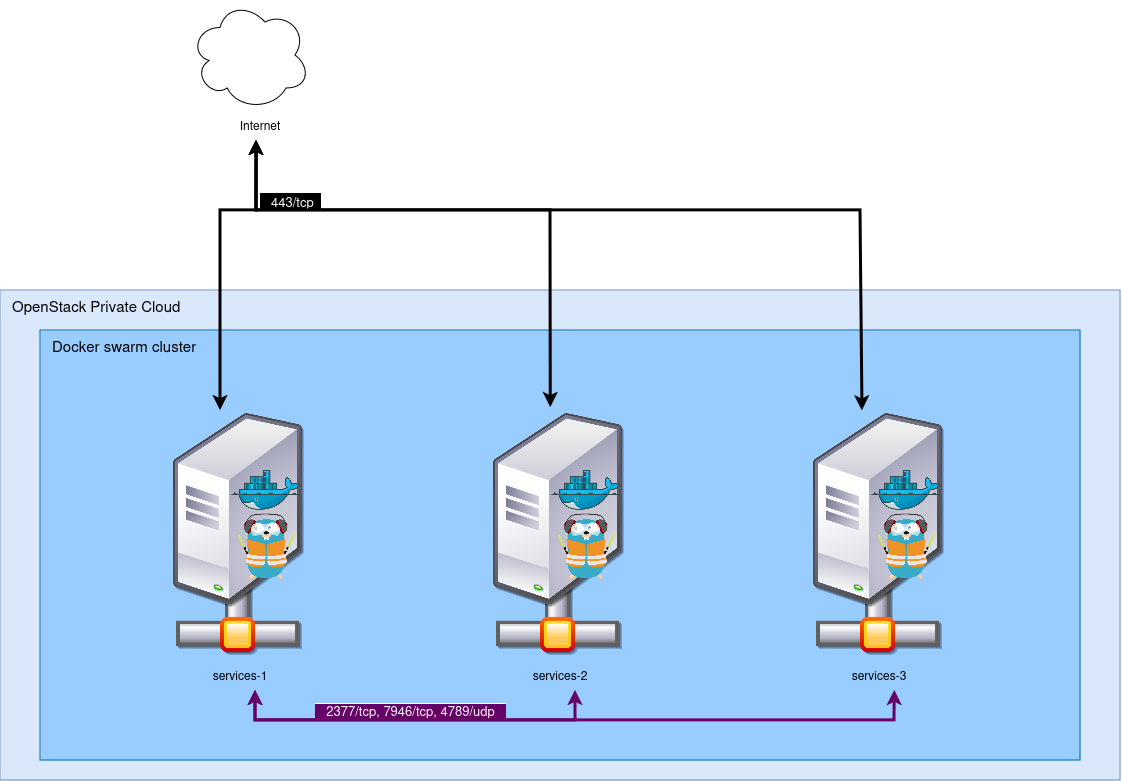
We want to upgrade our cluster to switch it to Alpine 3.18 (yes, this post took a while to come out!), and Docker Engine 26. Furthermore, we wish to modify several configurations located in our initialization file, which will imply having to destroy and rebuild the instances.
The instances are built via OpenTofu on a private OpenStack, and deployed with Ansible.
The Docker Swarm cluster exposes about 50 services, the vast majority behind Traefik. The services are monitored and supervised, so at the slightest outage, it will be a JIRA ticket… And we don’t like JIRA tickets. 😣
Constraints
For this migration, we set two constraints:
- We must not cause any outage for end users;
- We must not be resource-intensive: as much as possible, we will try to never exceed three instances in the project. In reality, this constraint is self-imposed, for the challenge, since we are on a private Cloud without capacity or cost constraints.
Theoretical Concept
In theory, the migration should look like this:
- Take the first node;
- Isolate it from the general public;
- Drain the services;
- Destroy/recreate the instance;
- Have it join the cluster;
- Reopen it to the public.
All this, three times. Any objections? No, sure sure? Well then, let’s go.
We are however going to add a “cleanliness” constraint: all the actions we take must be performed via OpenTofu, and not by hand. The idea behind it is to be able to automate the process one day, and in the meantime, document it for the next people who will work on the project.
1. Isolation
First, we are going to isolate the first instance that will be the victim of the reinstallation. For this, we just need to remove the DNS record of *.cluster.my-example.com pointing to this machine, given our configuration.
Except that two problems arise:
TTL (Time To Live)
To relieve DNS servers and avoid generating unnecessary traffic, DNS records have a TTL, indicating after how much time a client must perform a new DNS query to obtain an up-to-date resolution. The longer the TTL, the slower the propagation. Our DNS zone was configured with a TTL of 3600 seconds, or one hour. We temporarily update the TTL to be 300 seconds (5 minutes), so we don’t have to wait an hour between each modification.
OpenTofu
Our OpenTofu is not at all designed to remove DNS records on the fly: it retrieves the list of generated instances and adds each floating IP it finds in the record. It is therefore time to modify our OpenTofu a bit: We add an instances_in_maintenance variable which is an array of strings. Instances whose names are mentioned in this array will be excluded from the DNS record. Below is an overview of the code.
variable "instances_in_maintenance" {
  default = []
}

resource "openstack_dns_recordset_v2" "public_record" {
  zone_id = "xxxxxxxxxxxxxxxx"
  name    = "*.cluster.my-example.com."
  ttl     = 300
  type    = "A"
  records = compact(
    toset(
      flatten(
        [
          for k, v in openstack_compute_instance_v2.instance :(contains(var.instances_in_maintenance, v.name) ?
          "" :
          openstack_networking_floatingip_v2.fip[k].address)
        ]
      )
    )
  )
}
Note: the OpenTofu code is stripped of many parts unnecessary for understanding the article, and is provided without guarantee of operation here.
Here, the magic lies in the records argument of our DNS record: For each instance created, we look at its name. If it is present in the instances_in_maintenance list, its IP is not added.
We launch a first tofu plan to check that our change doesn’t break everything, then a tofu apply with our first machine (swarm-1) in the list of hosts in maintenance. Now, all that’s left is to wait 5 minutes for the DNS propagation to happen everywhere.
2. Draining Services
Now that the node is inaccessible, it’s time to purge it. For this, nothing could be simpler, since Docker Swarm allows modifying the availability of a node, notably for maintenance actions. Just type the command docker node update --availability drain <node_name> to empty the node of its services and have them restart elsewhere. We take the opportunity to force the node to leave the cluster: as we are performing a complete reinstallation of the instances, the unique identifier of this node will be lost. Telling Swarm about its departure helps reduce network load and the risk of repeated leader re-election. For this, we launch the command docker node demote <node_name> followed by the command docker swarm leave on our node being updated.
Services are drained and the node has successfully left the cluster, we can now destroy it.
3. Destroying and Recreating the Instance
To destroy and recreate the instance, we will of course use OpenTofu. However, when we created our stack, we hadn’t thought about needing to delete a single machine, so we used a count. For people not familiar with OpenTofu, this instruction allows asking the tool to perform an action several times; and we can retrieve the current iteration with the count.index argument. This option is very simple and practical, but it has a huge flaw: we don’t control the instances deleted by OpenTofu. If we change our count=3 to count=2, OpenTofu will systematically destroy the last instance it created. This is problematic for us, as we want to do exactly the opposite!
We then have no choice but to modify our OpenTofu to switch to a for_each system. The for_each argument allows passing an array to OpenTofu, which will perform an action for each element of the array and use it as a key. For example, if we use the array ["0","1","2"] on an instance creation module, OpenTofu will create a dictionary, which will contain for each key a specific associated instance. This system thus allows us to be able to delete a specific instance (for example 1), without altering the other two.
Code before:
resource "openstack_compute_instance_v2" "instance" {
  name        = "swarm-${count.index}"
  image_id    = "xxxxxxxxxxx"
  flavor_name = "medium-4g"

  network {
    uuid = "xxxxxxxxxxxx"
  }

  count = 3
}
Note: the OpenTofu code is stripped of many parts unnecessary for understanding the article, and is provided without guarantee of operation here.
Code after:
variable "instances" {
  default = ["1", "2", "3"]
}

resource "openstack_compute_instance_v2" "instance" {
  name        = "swarm-${each.value}"
  image_id    = "xxxxxxxxxxx"
  flavor_name = "medium-4g"

  network {
    uuid = "xxxxxxxxxxxx"
  }

  for_each = var.instances
}

resource "openstack_dns_recordset_v2" "public_record" {
  zone_id = "xxxxxxxxxxxxxxxx"
  name    = "*.cluster.my-example.com."
  ttl     = 300
  type    = "A"
  records = compact(
    toset(
      flatten(
        [
          for k, v in module.swarm_instance : (contains(var.instances_in_maintenance, k) ? "" : v.fip[0].address)
        ]
      )
    )
  )
}
Note: the OpenTofu code is stripped of many parts unnecessary for understanding the article, and is provided without guarantee of operation here.
We try to launch a tofu plan again, and then disaster strikes: OpenTofu wants to destroy and recreate everything! And yes, our change from count to for_each is far from trivial, and OpenTofu doesn’t know how to handle such a change. One solution then, to not break everything: modify the .tfstate file by hand.
I won’t detail the process here, as it was very manual, very long, and not very interesting. Conceptually, here’s what we did:
- We deployed (and immediately destroyed) a new environment with
for_each, in order to retrieve the structure of the.tfstatefile; - Then we modeled the old
.tfstateon the format of the new one; - And we used this modified
.tfstatethereafter.
If you need to perform this operation too, make sure you have a backup of your .tfstate file safe and sound!
Once these inconveniences (and the many required adaptations) were over, we were able to destroy and recreate our instance. For this, especially do not launch a tofu destroy, but indeed twice tofu apply: once after removing the instance from the instances variable, and once after putting it back.
Our node is reinstalled in Alpine 3.18 🎉.
4. Joining our Swarm Cluster
In our context, we already had a vast collection of tools built with Ansible that allowed us to reinstall Docker and have the node join the cluster automatically. If this is not your case, you just need to reinstall Docker (under Alpine, apk add docker-ce), and have it join (on a node still in the cluster, type the command docker swarm join-token manager to obtain a token).
Your new node then starts hosting services again. Once our Traefik is back on this node, we can reopen the node to the public!
5. Reopening the node to the public
Now that our new instance is working and services are back on it, we can reopen this instance to the general public. For this, nothing could be simpler: just remove the instance from the instances_in_maintenance variable, and launch a small tofu apply. Then wait for the DNS propagation to happen, and you’re done (for this node).
All that’s left is to do this two more times! Rest assured, since we’ve already cleared the hurdles with the first instance for OpenTofu, you shouldn’t have any more bad surprises…
What to take away from it?
We drew many lessons from this maintenance operation, which was not easy.
Swarm
First, we can conclude that Docker Swarm is, once again, stable and reliable. Despite the many operations concerning its nodes, and all the sub-operations that this may have caused (re-balancing of services, service restarts, network routes to recreate, etc.), Swarm never failed us! A real asset in these conditions. Furthermore, the large version difference (5 major versions apart) did not disturb it either.
In short, Docker Swarm is not hype, nor very “sexy”, but it works (and that’s the most important thing!).
Our “network” architecture
Round-robin DNS is not ideal for many reasons, and we know it. This method of operation once again slowed us down, due to propagation delays. In the future, we should consider using a real load-balancer to avoid this kind of issue. To stay on OpenStack, Octavia seems to be a solution perfectly suited to this problem, but other tools could achieve the same goal.
Apart from this slight inconvenience, nothing to report on this side either, we are quite happy with our infrastructure in place.
Traefik, for its part, allowed the migrations to be truly invisible as they were being performed. Finally, Traefik, and the service mesh + dynamic DNS of Docker Swarm also helped us a lot. 😉
Automation stack note
In reality, our real problem was our automation stack. Not the fault of the tools, but indeed ours, as we hadn’t sufficiently anticipated our needs: now that we look in the rearview mirror, it seems obvious that the need to be able to delete instances independently should have been a must-have from the start of writing our OpenTofu stack. However, we can note OpenTofu’s adaptability: despite our beginner mistakes, we managed to correct the situation in a little less than half a day (including .tfstate modification), and landed at our final state without any breakage. And that’s Dallas-style class! 😎
Our Ansible stack, for its part, was largely up to the task and allowed us to perform all the actions we needed without any difficulty.
To conclude
We can conclude this article by saying that all the objectives were achieved: we managed to update an entire cluster without interruption for our users, without having to deviate from our technological base. Our services (mostly coded in Go) handled the blow perfectly, and our “low-level” infrastructure (Alpine/Docker Swarm) and our automation stack (Ansible/OpenTofu) gave us complete satisfaction, and comforted us in the certainty that our technical choices are consistent with our needs.
In short, it’s a great experience and a great success!